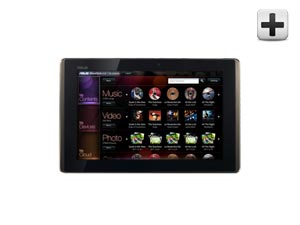
| Eee Pad Transformer TF101-A1
Not in stock. |
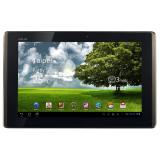
View More Pictures
|
Գինը
239,000 դրամ
Ապառիկ (36 ամիս, 0% կանխավճար, 0% տոկոսադրույք)
ամսական 6,600 դրամ + 0.95% ամսական բանկի սպասարկման վճար:
Ապառիկ (24 ամիս, 0% կանխավճար, 0% տոկոսադրույք)
ամսական 9,900 դրամ + 0.95% ամսական բանկի սպասարկման վճար:
Ապառիկի ձևակերպումները իրականացվում են տեղում` առանց բանկ այցելելու.
կարդալ մանրամասն.
|

|
|
|
|
|
| Description |
|
Some things are meant to go together
Transforming the Conventional into the Unconventional
With a slim, lightweight design and a 10.1-inch WSVGA IPS capacitive display
made from durable and scratch-resistant glass that is viewable at angles up to
178°, the versatile Eee Pad Transformer is the perfect tablet for anyone who
wants to enjoy multimedia on the move, but still wishes to have easy access to
the web, email, and other productivity applications. A custom user interface
provides easy access to the many features of the Android 3.2 (Honeycomb)
operating system, while the NVIDIA® Tegra™ 2 chipset
provides full support for Adobe® Flash® 10.2,1
smooth HD video conferencing and playback, a lightning fast web experience, and
incredible mobile gaming performance. The optional docking station turns the Eee
Pad Transformer into PC mode with a QWERTY keyboard, while extending battery
life up to 16 hours.2 Front and rear cameras make for easy video chat
and digital photography, which can be played back in video on HDTVs via a mini
HDMI output port, making it a true mobile entertainment device.
Awards Received
"… the best Android slate we've seen" – Computer Shopper
"A convenient keyboard dock, sleek design, and aggressively low price make
the Eee Pad Transformer our favorite Wi-Fi-only Honeycomb tablet." – Laptop
Magazine
"Of all of these new entrants, the Eee Pad Transformer impresses us most so
far—and not just because of its low price tag. The 10-inch slate is lighter than
competing Honeycomb tablets, features an IPS screen for wider viewing angles,
and plugs into an optional keyboard dock that adds more battery life. It's this
kind of combo that could prove a hit with the back-to-school crowd, as well as
mobile professionals who want to take notes in meetings. The dock adds a
reasonable $149 to that rock-bottom $399 price." – Laptop Magazine
"… the Honeycomb tablet to get.." – Anandtech
Key Features
- 10.1-inch WSVGA IPS capacitive pressure-sensing multi touch
display for brilliant HD entertainment and intuitive navigation.
178° viewing angle (1280 x 800)
- Powered by NVIDIA® Tegra™ 2 mobile
processor for best web experience with up to two times faster
browsing, hardware accelerated Flash, and console-quality gaming
- Front (1.2 MP) and rear (5 MP) cameras for face-to-face
video chats and on-the-go video and picture capturing
- Mini HDMI port to supersize your entertainment to
compatible HDTVs and external displays
- Optional Docking station with QWERTY keyboard adds
additional 6.5 hours of battery life, to instantly turn the Transformer into
PC mode with up to 16 hours of battery life 2
Learn More
When Tablet meets Keyboard
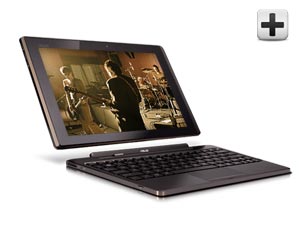
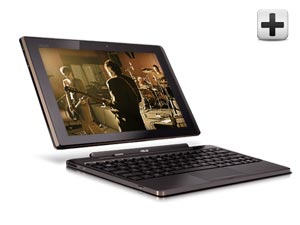
Breaking the mold, an optional keyboard
docking station designed especially for the Eee Pad Transformer
transforms your tablet into PC mode with a 92% sized QWERTY keyboard
with unique Android Function (Fn) keys for added convenience.
Featuring all of the connectivity you'd expect in your notebook, the Eee
Pad Transformer comes complete with 2 USB 2.0 ports, a headphone audio
jack and a 4-in-1 card reader when used with the optional docking
station. Also to keep you unplugged longer without interruption, the
optional keyboard docking station adds an additional 6.5 hours of
battery life, allowing the Eee Pad Transformer to last up to an
astounding 16 hours.
When Android meets Tegra
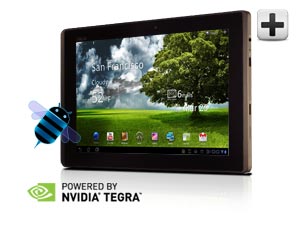
Designed specifically with tablets in
mind, the Android Honeycomb 3.2 operating system provides you with
optimized features and functions such as multi-touch and a holographic
interface that allows you to access widgets and shortcuts with ease. Get
refined multitasking, rich notifications, Home screen customization,
widgets, and more. And experience the web with Adobe® Flash®
10.21 for added convenience.
Other Android Features:
- Customizable Home screens
Five customizable Home screens give users instant access to all parts of
the system from any context. Each screen offers a large grid that
maintains spatial arrangement in all orientations. Users can select and
manipulate Home screen widgets, app shortcuts, and wallpapers using a
dedicated visual layout mode. Visual cues and drop shadows improve
visibility when adjusting the layout of shortcuts and widgets. Each Home
screen also offers a familiar launcher for access to all installed
applications, as well as a Search box for universal search of apps,
contacts, media files, web content, and more.
- Recent Apps, for easy visual multitasking
Multitasking is central to the Android 3.2 experience. As users launch
applications to handle various tasks, they can use the Recent Apps list
in the System Bar to see the tasks underway and quickly jump from one
application context to another. To help users rapidly identify the task
associated with each app, the list shows a snapshot of its actual state
when the user last viewed it.
- Redesigned keyboard
The Android soft keyboard is redesigned to make entering text fast and
accurate on larger screen sizes. The keys are reshaped and repositioned
for improved targeting, and new keys have been added, such as a Tab key,
to provide richer and more efficient text input. Users can touch-hold
keys to access menus of special characters and switch text/voice input
modes from a button in the System Bar.
- Improved text selection, copy and paste
When entering or viewing text, a new user interface lets users quickly
select a word by press-hold and then adjust the selection area as needed
by dragging a set of bounding arrows to new positions. Users can then
select an action from the Action Bar, such as copy to the clipboard,
share, paste, web search, or find.
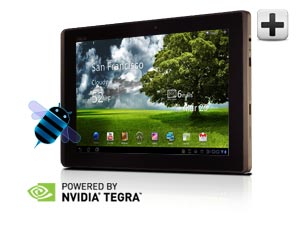
NVIDIA® Tegra™ 2, world's first mobile super chip,
brings the fastest, most visually-rich tablet experience ever seen. The
Eee Pad Transformer takes full advantage of this mobile dual-core
processor, providing extreme multitasking capability with the best web
experience – up to two times faster browsing, hardware accelerated
Flash, and NVIDIA® GeForce® gaming.
When Multimedia meets Functionality
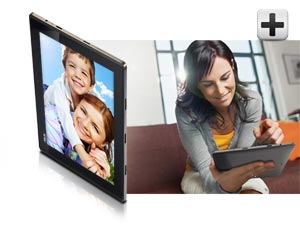
Experience the wonders of video chat and
crisp digital photography with front (1.2MP) and rear (5MP) facing
cameras, which can be played back in video on HDTVs via a mini HDMI
output port. Built in SRS Sound technology also provides a dynamic 3D
stereo audio experience with maximum bass response and a wide sound
field from the built-in speakers.
When the Cloud meets Convenience
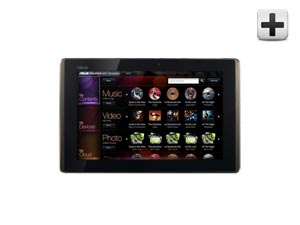
ASUS' Waveshare Interface hosts a
variety of unique applications that help you easily launch software,
manage content and access online services and connect devices with a few
simple taps.
- MyNet
Allows users to easily stream digital media wirelessly within home
network devices with the Eee pad Transformer. Play HD videos or music on
any home network devices such as the HDTV monitor or desktop PCs for an
even better experience from the Eee Pad Transformer.
- MyLibrary
Consolidates downloaded books, magazines and newspapers in to one easy
to browse profile.
- MyCloud
MyCloud is a total cloud solution, providing access to digital content
such as music, videos and files from the cloud anywhere, anytime. Users
can even use MyCloud to remotely access and control any PC or Mac system
and access applications or files to extend the versatility of the Eee
Pad Transformer experience.
Relax, ASUS Has You Covered
Ranked as the #1 most reliable PC brand by 3 independent sources3,
readers and editors alike choose ASUS as their trusted notebook and netbook. We
tirelessly strive to exceed expectations of quality to ensure you an unmatched
peace of mind every time you start your PC.
We also back our commitment with the industry's most comprehensive
warranty.
- 1 year North America warranty
- Free one-way standard shipping
- 24/7 tech support
What's in the Box
- ASUS EeePad Transformer TF101
- User manual
- Power adaptor with USB to 40 pin connector
- Warranty card
Specifications
- Operating System: Android 3.2 (Honeycomb) Platform
- Display: 10.1-inch WSVGA IPS capacitive multi touch
display built with durable and scratch-resistant glass; 178° viewing
angle(1280 x 800)
- Chipset: NVIDIA® Tegra™ 2 Mobile
Processor
- Memory: 1GB DDR2
- Wireless: 802.11b/g/n
- Bluetooth: Bluetooth v2.1 + EDR
- Storage: 16GB eMMC Flash (Memory expansion via microSD
card slot with support for optional cards up to 32 GB (functionality
requires future software upgrade)
- Camera: 1.2 megapixel (Front); 5.0 Megapixel (Rear)
- Speakers: SRS Sound
- Card Reader: Micro SD Card Reader
- Input / Output: 1 x Mini HDMI, 2-in-1 audio jack (head
phone/mic-in jack), internal mic
- Battery Pack: 24.4 W/h Li-polymer battery (up to 9.5
hours)1
- Dimensions: 10.67" x 6.89" x 0.47" –inches (W x D x H)
- Weight: 1.5lbs
- Color: Espresso
|
| Product Details |
|
| Key Features |
| Operating System: | 1GB of DDR2 SDRAM |
| Operating System: | Android 3.2 Operating System |
| OS: | up to 9.5 hours |
| Processor: | 16GB Internal Flash Memory |
| Processor: | NVIDIA Tegra 2 CPU |
| Video: | 10.1" WSVGA (1280x800) IPS Capacitive LED Touchscreen |
|
| Facebook Discussions |
|
|
|
More Pictures: |
|
 |
 |
 |
 |
|
|